
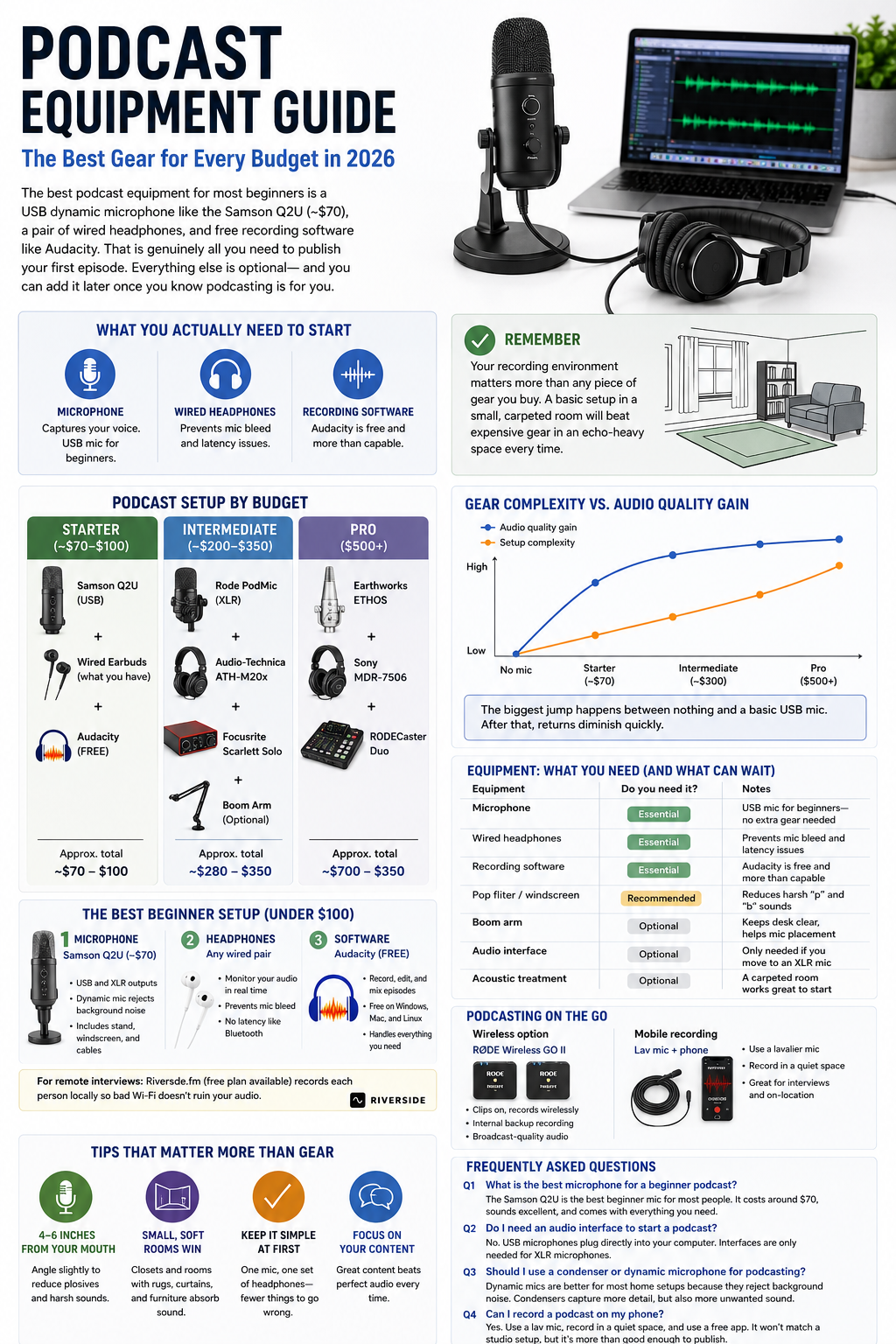
If you’re asking “what equipment do I need to start a podcast?” — the short answer is a microphone, wired headphones, a pop filter, a mic stand, and free recording software. A USB microphone plugged into your existing computer is enough to publish your first episode — no audio interface or mixer required.
Start With What You Already Own
Before spending anything, check what you have. A smartphone, laptop, wired earbuds, and a quiet room are enough to record a listenable first episode. Most beginners already own three of those four.
Record 60 seconds of yourself speaking at normal volume and play it back. Listen for three things: echo (sound bouncing off hard walls), background hiss (HVAC, traffic, electrical hum), and proximity (does your voice sound thin and distant, or present and warm?). That playback tells you more than any spec sheet.
If your recording has less than two or three seconds of audible reverb tail and you can hear your voice clearly over background noise, you are ready to record. Ship the episode. Fix the gear later.
Perfectionism at the equipment stage is one of the main reasons people never start. Episodes that almost didn’t get published because “the audio wasn’t ready” routinely sound better than expected once released. The audience you want to reach cares far more about your content than about whether you own a $400 microphone.
The Full Podcast Equipment List
Every category below has a free or sub-$100 entry point. You do not need all of them on day one.
Microphone — The Purchase That Matters Most
The microphone is the one hardware decision that actually affects your audio quality. Everything else is secondary.
USB microphones connect directly to your computer — no extra hardware needed. The best picks at the beginner tier:
- Samson Q2U (~$70): USB and XLR outputs, dynamic capsule, ships with a desk stand. The most flexible entry-level option available.
- Audio-Technica ATR2100x-USB (~$79): Nearly identical feature set, slightly tighter cardioid pattern.
XLR microphones require an audio interface between the mic and your computer. Worth it eventually, but not on day one unless you already own an interface. When you get there: the Rode PodMic (~$100) and Shure SM7dB (~$400) are both strong picks.
Dynamic vs. condenser: Start with a dynamic mic. Dynamic microphones reject ambient sound and are forgiving in untreated rooms. Condenser microphones are sensitive — they capture room reflections, keyboard clicks, and air conditioning hum. In an average home setup, the room wins against a condenser every time.
| Factor | USB | XLR |
| Budget | Under $100 total | $100+ mic plus ~$120 interface |
| Solo vs. multi-host | Solo, or remote co-host | In-room multi-host |
| Tech comfort level | Low — plug and play | Medium — signal chain setup |
| Verdict | Most beginners | Episode 10+, or existing interface |
Headphones — Why Wired Is Non-Negotiable
Bluetooth headphones introduce latency that makes real-time monitoring during recording effectively useless — you hear yourself a fraction of a second late, which disrupts natural speech rhythm. Use wired headphones. Closed-back headphones (sealed ear cups) prevent microphone bleed from headphone audio.
The Sony MDR-7506 (~$100) is widely used across radio stations and recording studios. If you already own wired earbuds, those work fine for episode one.
Pop Filter and Windscreen
A pop filter is a nylon disc that clips to a boom arm and sits between your mouth and the microphone, breaking up the burst of air from plosive consonants (P, B, T). Use this for desk recording.
A windscreen is a foam cap that fits over the microphone capsule. It reduces wind noise and is designed for outdoor or mobile recording. Less effective than a pop filter at eliminating plosives.
Mic Stand or Boom Arm
Consistent microphone placement produces consistent audio. The standard recommendation is 6–8 inches from mouth to capsule. Moving closer makes your voice sound boomy; pulling away makes it thin.
- Desktop stand (~$10–$20): Sits on your desk, limited repositioning.
- Clamp-mount boom arm (~$20–$30): Attaches to desk edge, swings out of the way when not recording. Better value even at the beginner level.
Recording Software — Free Options Work Fine
This is the category where beginners most commonly overspend. Free tools are genuinely capable of producing professional-sounding episodes.
- Audacity (free, PC and Mac): The default recommendation for beginners. Multi-track editing, noise reduction, MP3 export. Not the prettiest interface, but fully functional — according to Wikipedia, it has been downloaded over 114 million times and remains the world’s most popular free audio editing application.
- GarageBand (free, Mac only): Cleaner interface than Audacity; good enough to publish professional-sounding episodes without any paid upgrades.
- Spotify for Podcasters (free, browser-based): Records, edits, and distributes in one place. The lowest-friction option if you want to skip software entirely and get your first episode live as quickly as possible.
- Descript (~$24/month): Transcription-based editing — cut words from the transcript and the audio cuts too. Genuinely useful once you have an established editing workflow, but overkill for episode one.
- Adobe Audition (~$55/month): Professional broadcast software. Skip it until the free tools are genuinely limiting you — which for most independent podcasters, they never do.
Three Setup Tiers at a Glance
| Category | Starter (~$0–$100) | Mid (~$100–$300) | Pro ($300+) |
| Microphone | Samson Q2U USB (~$70) | Rode PodMic XLR (~$100) | Shure SM7dB (~$400) |
| Headphones | Wired earbuds you own | Sony MDR-7506 (~$100) | Beyerdynamic DT 770 Pro (~$170) |
| Interface | Not needed (USB mic) | Focusrite Scarlett Solo (~$120) | Universal Audio Volt 2 (~$200) |
| Pop Filter | Foam windscreen (~$8) | Clip-on nylon filter (~$15) | Boom arm with integrated filter |
| Software | Audacity (free) | Descript (~$24/mo) | Adobe Audition (~$55/mo) |
| Est. Total | ~$0–$80 | ~$300–$450 | $600+ |
Most people publish good podcasts from the starter tier for years. Move to the mid tier when you have published 10 or more episodes and listener feedback specifically mentions audio quality, or when you are adding a regular in-room co-host.
Fix the Room Before Upgrading the Mic
Acoustic treatment is the highest-ROI investment at the beginner level. A modest microphone in a well-treated room produces better audio than an expensive microphone in an untreated one.
Hard, flat walls reflect sound back toward the microphone. Those reflections get recorded alongside your voice as echo. At the beginner tier, room treatment eliminates more audible problems per dollar than any hardware upgrade.
Five free acoustic fixes:
- Closet recording — Hanging clothes act as diffusers. A walk-in closet is one of the best natural recording environments in most homes.
- Blanket tent — Drape a thick duvet over your head and the microphone. Immediate reverb reduction.
- Car interior — Soft seats, carpet, and no parallel walls make this one of the quietest acoustically neutral spaces available without construction.
- Book-filled shelves behind the mic — Irregular surface shapes scatter reflections rather than bouncing them back.
- Corner recording with heavy curtains — Fabric absorbs rear reflections before they reach the capsule.
Apply all five free fixes first. If processed audio still has an audible reverb tail after noise reduction, a multi-pack of acoustic foam panels (well under $50) attached directly behind your recording position is the next step.
Do You Need an Audio Interface or Mixer?
Audio interface: Converts an XLR microphone’s analog signal into digital. You only need one if you own or plan to buy an XLR mic. The Focusrite Scarlett Solo (~$120) is the standard beginner pick.
Mixer: Routes multiple audio channels in real time — EQ, sound effects, multiple microphones simultaneously. Built for live-to-air broadcast workflows. If you record solo episodes and edit afterward, a mixer adds complexity without adding value. Skip it until live production is an explicit goal from episode one.
Recording Remote Guests
Do not use general video-call platforms as your primary audio recorder. Many apply real-time noise suppression and dynamic compression to every call, degrading voice quality in ways that cannot be fully reversed in editing.
The professional workaround is the double-ender method: each participant records their own audio locally, then sends the raw file to the host after the session. The host merges the tracks in editing. The result is two clean, uncompressed recordings regardless of internet connection quality.
Remote recording platforms — these record each participant locally and sync the files automatically:
- Riverside.fm (~$15/month): Local recording, video and audio, separate tracks per guest. Best for video podcasters who need publishable footage alongside the audio.
- Zencastr (freemium): Audio-first, easy guest link flow, no app download required for guests. Best for audio-only beginners who want a reliable free starting point.
- Cleanfeed (free tier): Browser-based, favoured by radio producers, minimal interface. A solid free option for hosts who want simplicity without sacrificing quality.
Verdict: use Riverside if video matters to your format. Use Zencastr or Cleanfeed for audio-only shows. Either way, avoid standard video calls as your primary recording method.
Common Mistakes That Cost Beginners Time and Money
- Buying XLR before understanding the signal chain. XLR adds an interface, cables, and extra troubleshooting. Buy it after publishing a few episodes.
- Choosing a condenser mic for an untreated room. The room becomes the dominant sound. Start with a dynamic mic.
- Monitoring with Bluetooth headphones. The latency alters your speech cadence. Wired only.
- Buying a mixer before understanding your format. Most independent podcasts are recorded and edited — a mixer adds nothing to the final product until the format explicitly demands it.
- Upgrading the microphone before fixing the room. The most common expensive mistake in podcasting.
Day-One Setup: Step by Step
- Record 60 seconds on your smartphone and listen back for echo, hiss, and proximity. Cost: $0.
- Buy a USB dynamic microphone (~$70) — the Samson Q2U or ATR2100x-USB are both solid.
- Use the wired headphones you already own, or buy wired earbuds (~$15–$20).
- Add a clip-on pop filter or foam windscreen (~$8–$15).
- Add a desktop stand or clamp-mount boom arm (~$15–$30). Position the capsule 6–8 inches from your mouth.
- Download Audacity (free) or GarageBand (free, Mac). Do not pay for software at this stage.
- Apply one free acoustic fix before recording episode one — even just recording in a closet.
Total cost at step 7: approximately $100–$115 if you own nothing. Less if you already have wired headphones.
Conclusion
The honest answer to “what equipment do I need to start a podcast?” is: a dynamic USB microphone, wired headphones, and free recording software. That combination — costing around $100 — produces publishable audio and has launched thousands of successful shows. With data from Statista showing that 47 percent of U.S. adults listened to a podcast in the past month in 2024, the audience for new voices has never been larger.
Room acoustics matter more than microphone price at the beginner level, and most acoustic fixes cost nothing. The five free room treatment options in this guide will improve your recordings more than doubling your microphone budget would. Apply them before spending another dollar on hardware.
The upgrade path from there is clear and conditional. Move from USB to XLR when you have a consistent publishing rhythm and an in-room co-host. Move from free software to paid only when the free tools are genuinely limiting your workflow — which for most podcasters, they never are.
The most important piece of equipment is not on any gear list: it is the decision to publish. Record a test episode today, upload it to a free hosting platform, and get episode one in the world. The next gear decision becomes obvious once you are a podcaster rather than someone planning to be one.
FAQ
What equipment do I need to start a podcast?
At minimum: a microphone, wired headphones, and free recording software. A USB dynamic microphone (~$70), a pair of wired earbuds you already own, and Audacity or GarageBand is a complete setup. Total spend under $100 for everything you do not already own.
What is the minimum amount I need to spend to start a podcast?
You can start for $0 using your smartphone and free recording software. A USB mic (~$70) and wired headphones represent the first meaningful hardware upgrade. Total minimum spend for noticeably better audio: under $100. The room you record in has more impact on audio quality than any single piece of gear.
Can I record a podcast on my phone?
Yes. Smartphones record clean audio in quiet spaces. Use a built-in voice memo app or a free recorder app. A clip-on lavalier mic (~$20–$30) improves quality without a full studio setup. Recording in a closet or car produces the cleanest result — the soft materials absorb reflections that would otherwise muddy your audio.
Should beginners start with USB or XLR?
Start with USB. No interface needed, fewer cables, simpler troubleshooting. The Samson Q2U has both USB and XLR outputs on the same microphone, so you can start USB and switch to XLR later without buying a new mic. Choose XLR from day one only if recording two or more hosts in the same room, or if you already own an audio interface.
Do I need a pop filter?
Not always, but yes for most desk setups. A pop filter eliminates the plosive thumps from P and B sounds that would otherwise ruin otherwise clean recordings. Many beginner microphones include a foam windscreen — that works as a starting point. A dedicated clip-on nylon pop filter (~$8–$15) is a small upgrade that pays dividends immediately.
Do I need a podcast mixer?
Most beginners do not. A mixer is built for live broadcast workflows — controlling multiple microphone levels in real time and adding sound effects on the fly. If you record and edit your episodes after the fact, which describes the vast majority of independent podcasts, a mixer adds hardware complexity without improving the final product. Skip it until the format explicitly demands it.
What recording software should I use?
Audacity (free, PC and Mac) is the standard beginner recommendation. GarageBand (free, Mac only) is cleaner and equally capable. Both produce results good enough to publish professional-sounding episodes. Paid options like Descript and Adobe Audition are worth exploring once you have an established workflow and the free tools are genuinely limiting you.
Do I need acoustic treatment?
Not immediately. The five free fixes — closet recording, blanket tent, car interior, bookshelves behind the mic, heavy curtains — eliminate most room noise problems at no cost. Foam panels (under $50 for a starter pack) become relevant only after you have applied all the free options and still hear an audible reverb tail in your processed recordings. Fix the room before you upgrade the mic.